Pure Data to drumlogue Converter
This web application allows you to convert Pure Data patches into custom user units for the KORG drumlogue.
It’s a powerful and accessible way to build new sounds for your drumlogue — without writing a single line of C code.
Features
* Convert .pd patches into ready-to-use KORG drumlogue user units
* No need to install any software — runs entirely in your browser
* Supports synth, delay FX, reverb FX, and master FX units
* Copy built-in drumlogue sample data into Pure Data tables
* Handles mono and stereo samples, with optional guard-sample insertion for interpolation
Basic familiarity with Pure Data is assumed, but no prior experience with the logue SDK or C/C++ is required.
Try It Now
* Launch the converter
* Upload your .pd patch
* Receive a .zip file containing ready-to-load user unit files for your drumlogue
Sample Patches
Explore example patches and prebuilt binaries:
➡️ User Units and Pure Data Patches for drumlogue
Writing Your Own Patches
Supported Pure Data Objects
Under the hood, it uses hvcc_drumlogue, an external generator for HVCC, adapted to produce user unit code for the logue SDK for drumlogue. This converter is designed as a web-based interface to hvcc_drumlogue. It allows you to focus on patch design rather than build environments.
HVCC does not support every Pure Data object.
Refer to this official list:
➡️ Supported Vanilla Objects (hvcc documentation)
If you use unsupported objects, the conversion will fail. Please stick to this reference during development.
heavylib: A Patch-Compatible Utility Library
A Pure Data library called heavylib offers prebuilt audio utilities compatible with HVCC. While originally designed for DAW plugins, some parts work well with this web converter.
Receiving Parameters in Your Patch
Your Pure Data patch can receive parameter values from the drumlogue knobs like this:
[r myParameter @hv_param 0 100 50]
The symbol name (myParameter) is shown on the drumlogue’s display.
@hv_param must be placed as the second argument to expose the symbol as a parameter on drumlogue.
0 100 50 means the parameter’s min, max, and default values. These values must be integers.
Optionally, you can use floating-point numbers by adding “_f” to myParameter like this:
[r myParameter_f @hv_param 0 1 0.5]
The details of parameters are documented here:
➡️ Receiving Parameters (hvcc_drumlogue)
MIDI Events
The Pure Data objects [notein], [bendin], and [touchin] can be used in patches for synth units. The [ctlin] object does not work because all MIDI control messages are used to control the parameters of drumlogue instruments.
The MIDI channel number outlet of the [notein] object always outputs zero, regardless of the drumlogue MIDI channel settings.
The details of MIDI events are documented here:
➡️ MIDI Events (hvcc_drumlogue)
Using Sample Sounds
Sample audio data on drumlogue can be copied to a table whose name ends with “_s” and has the third argument @hv_table. The table can be used with [tabread~] and [tabread4~].
The sample data is specified by sending messages to the corresponding symbol whose name ends with “_set”.
The sample length can be received with the corresponding symbol whose name ends with “_size”.
Here is a basic Pure Data patch for sample playback:
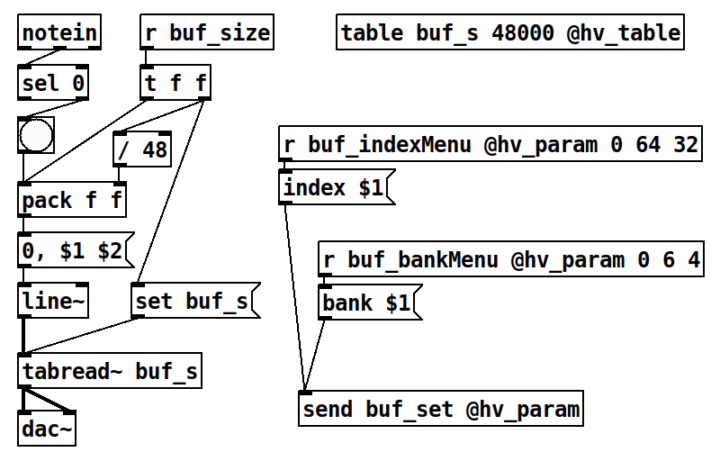
Due to the restriction of hvcc, it is required to send the [set tableName ( message to the [tabread~ tableName] object whenever the table size is changed.
The details of using sample sounds are documented here:
➡️ Using Sample Sounds in Your Pure Data Patch
(hvcc_drumlogue)
Restrictions
* The web app supports only single file patches, so Pure Data abstractions are not supported.
* hvcc unsupported objects cannot be used
* [ctlin] object is not supported
* The sampling rate is fixed to 48,000 Hz
* The number of output channels of [dac~] must be 1 or 2 for all types of units
* The number of input channels of [adc~] must be 4 for master FX units, and 2 for other types of units